Integrations
This page is for those who are looking to integrate their asset with Crest.
Atmospheric Scattering And Fog
Manual Integration
We provide a method to manipulate the final output of the shader without having to convert the Shader Graph.
Create a subgraph which takes a Vector3 input and Vector3 output
Create two Custom Function Nodes inside the subgraph
Both need to take a Vector3 input and Vector3 output, and pass them through. This prevents the compiler from stripping your code.
The first node needs to define static variables for anything you need from the Shader Graph
The second node needs to assign those static variables with the Shader Graph properties required by the integration
Define
CREST_INTEGRATE_COLOR_AFTER_FOGin the second node which performs the integration. This will run after Unity’s fog, but only for above water. There is alsoCREST_INTEGRATE_COLOR_FINALwhich runs last regardless.See Integrating Third-Party Sub-Graph for the final steps
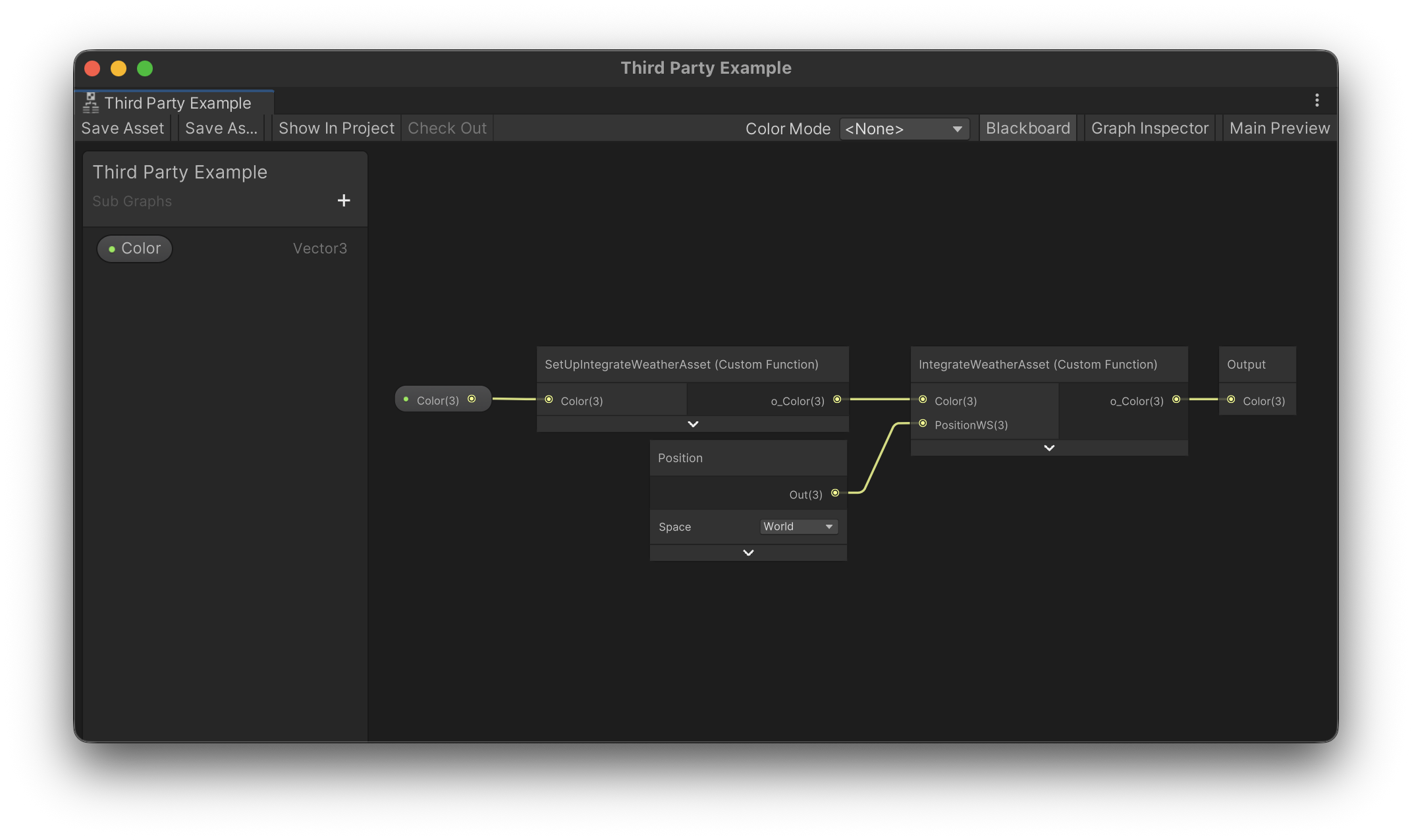
The following examples show the entire contents of the Custom Function Node (including the open-ended functions).
Tip
We only care about the signature of our macros, thus feel free to rename anything else to your liking.
An example of the SetUpIntegrateWeatherAsset node:
o_Color = Color; }

// If the integration needs properties from Shader Graph, you will need to define a
// static variable for each one here:
static float3 IntegrateWeatherAsset_PositionWS;

void SetUpIntegrateWeatherAsset_Close() {
An example of the IntegrateWeatherAsset node:
   o_Color = Color;

   // Assign properties from the Shader Graph to the static variables defined earlier:
   IntegrateWeatherAsset_PositionWS = PositionWS;
}

#ifndef SHADERGRAPH_PREVIEW

// Place any includes required by the third party here:
#include "<path-to-include>.hlsl"

// Define the CREST_INTEGRATE_COLOR_AFTER_FOG macro,
// which will run only for above water, here:
#define CREST_INTEGRATE_COLOR_AFTER_FOG(color) \
color.rgb = ApplyFog(color.rgb, IntegrateWeatherAsset_PositionWS);

// There is also the CREST_INTEGRATE_COLOR_FINAL (same signature) which runs at the
// end regardless.

#endif // SHADERGRAPH_PREVIEW

void IntegrateWeatherAsset_Close() {
Integrating Third-Party Sub-Graph
If a third party has provided a sub graph to integrate with Crest, then please do the following:
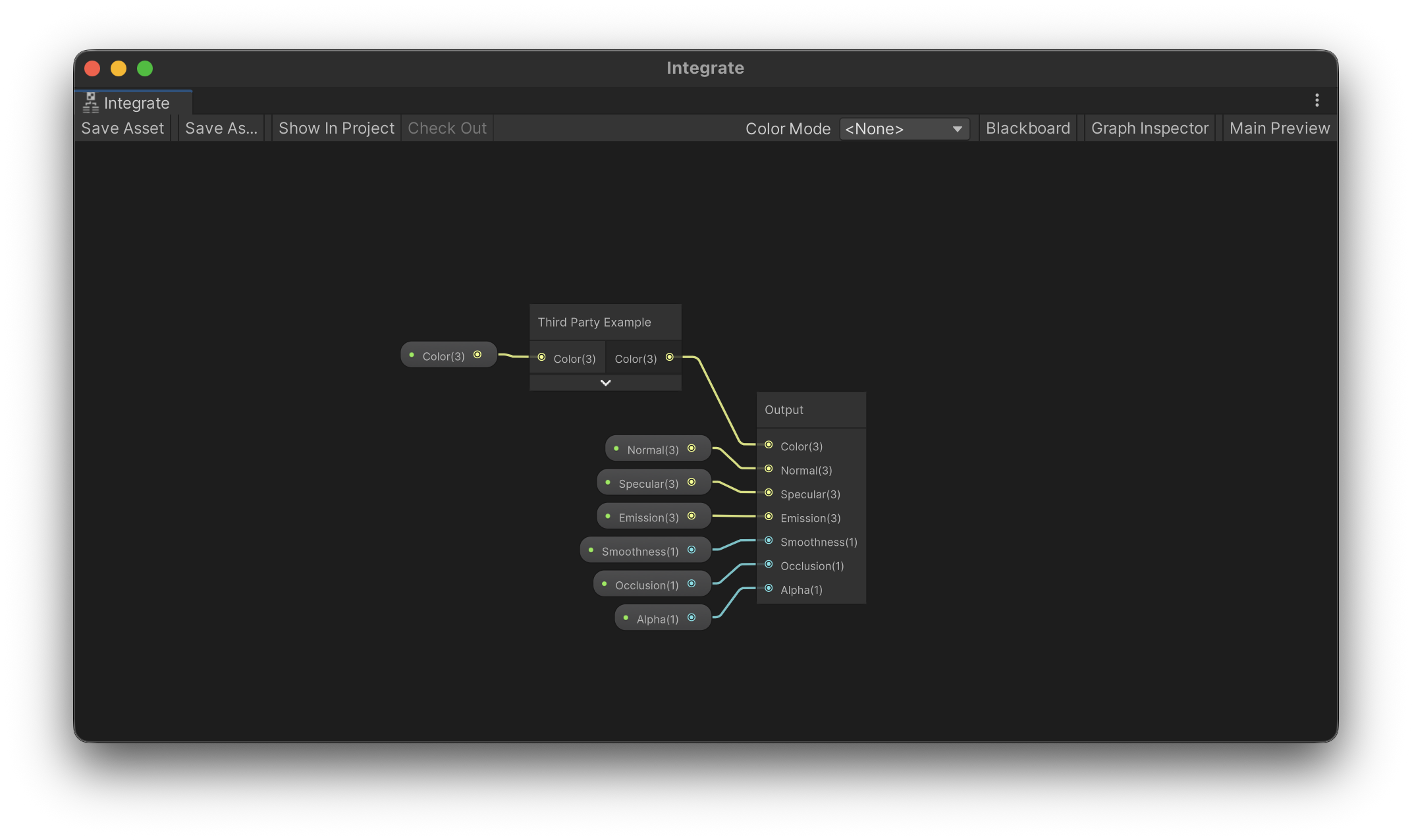
Add their node inside the Packages/com.waveharmonic.crest/Runtime/Shaders/Surface/Graph/Fragment/Integrate.shadersubgraph. The reason to integrate here instead of directly in the main graph, is that this will less likely to be updated by us.
Connect through all properties from the Blackboard to their sub graph, and then to the Output node.
The following example has an integration which only needs the color passed through.
Tip
When updating Crest, uncheck this file to avoid the importer replacing it. If this file needs updating, we will mention it as a breaking change in the release notes.